English
 한국어
 français
 Deutsch
 Español
 italiano
 русский
 português
 العربية
 Türkçe
 Polska

Galaxy projectors, aurora projectors and kids film projectors can all turn a plain bedroom ceiling into a colorful display. Yet they are not necessarily built around the same projection mechanism. One may display detailed images of planets and nebulae, another creates flowing Northern Lights effects, while a third projects recognizable shapes from themed films.
For retailers, distributors and OEM buyers, the distinction matters. Projection technology affects image clarity, motion, product cost, available themes and the functions customers expect. Choosing by appearance alone can lead to incorrect product descriptions or unsuitable purchasing decisions.
This guide compares galaxy projectors vs aurora projectors vs kids film projectors using actual product examples from OneFire. It explains how the effects are produced, what performance factors matter, and how to evaluate the right projector type for a retail or wholesale product line.
The Difference in 30 Seconds
Galaxy Projector:Designed to display celestial scenes such as stars, planets, the Milky Way or nebulae. Depending on the model, the effects may come from projection discs, optical lenses, LED lighting or laser-assisted patterns.
Aurora Projector:Emphasizes flowing bands of colored light inspired by the Northern Lights. Its main visual features often involve color transitions, movement speed and brightness adjustments.
Kids Film Projector:Uses illustrated films, patterned covers or interchangeable projection elements to display recognizable shapes, such as moons, animals, dinosaurs and themed characters. Some models rotate the projected patterns.
1. How Do Galaxy, Aurora and Film Projectors Create Different Effects?
The easiest way to understand these products is to examine what they project, rather than their external shape. Three projectors may look similar on a shelf while producing very different images when switched on.
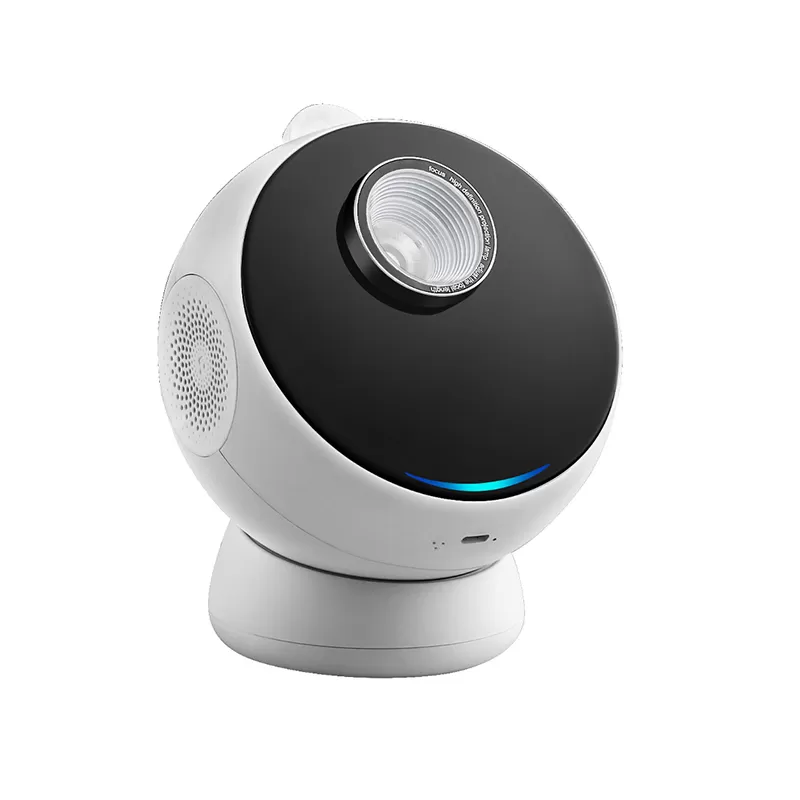
Galaxy Projection
Example: OneFire WH-E20
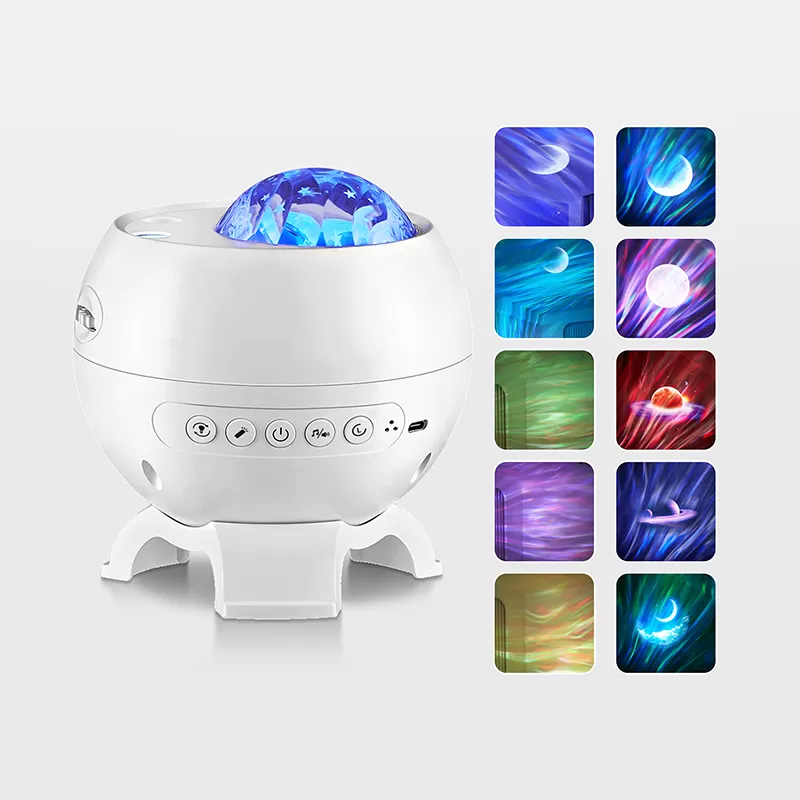
Aurora Projection
Example: OneFire WH-E12B

Themed Film Projection
Example: OneFire WH-E11
Galaxy Projectors: Celestial Images and Star Fields
A galaxy projector is defined primarily by its celestial imagery. Its output may include stars, planets, the Moon, galaxies or colorful nebula clouds. However, there is no single optical construction shared by every galaxy projector.
Some products combine LEDs that create cloud-like light patterns with laser points representing stars. Others use an optical lens and interchangeable image slides to project more detailed astronomical scenes. These two approaches can produce very different levels of image definition.
For example, the OneFire WH-E20 HD Galaxy Projector uses six projection slides covering subjects such as the Milky Way, Saturn, the Moon and Andromeda. It also lists adjustable focus and meteor effects. These functions distinguish it from a galaxy-style ambient lamp that creates primarily abstract clouds and star points.
Aurora Projectors: Flowing Bands of Colored Light
Aurora projectors aim to recreate the visual impression of the Northern Lights. Rather than displaying a detailed photograph of a planet, they usually emphasize moving colors, overlapping light patterns and smooth transitions across a wall or ceiling.
The WH-E22 Ocean Wave Aurora Projector illustrates this approach. It offers panoramic aurora lighting, multiple color selections, three movement settings—fast, slow and stop—and brightness adjustment. Other models, such as WH-E12B, add green laser stars and additional projection patterns. Therefore, not every aurora projector has the same light source or laser function.
Kids Film Projectors: Recognizable Shapes and Illustrated Themes
Children's film projectors usually emphasize recognizable images instead of abstract ambient effects. The projected content may come from interchangeable patterned films, transparent covers, cylinders or optical slides, depending on the model.
A dinosaur-themed projector might display animal silhouettes, while another model projects moons, stars or illustrated scenes. Certain designs rotate the film or projection assembly to create movement across nearby surfaces.
The OneFire WH-E11 Bunny's Carousel Projector combines themed projection films with a decorative bunny-carousel housing. Its available configurations include rechargeable, music box and Bluetooth versions. These electronic options are version-specific, not universal features of all children's film projectors.
2. Laser Stars, LED Aurora and Projection Films: The Optical Differences
Product names describe the visual result, but the optical components determine how that result is produced. This distinction matters when evaluating focus, image detail, movement and safety documentation.
Laser Star Effects
Laser-assisted projectors can produce relatively concentrated star points. They may be combined with LED-generated aurora or nebula patterns. Laser use must be verified by model: a product described as a galaxy or aurora projector is not necessarily a laser projector. Laser classification, user instructions and destination-market requirements should be checked before sale.
Moving LED Light Effects
LED light sources combined with optical elements can generate soft, overlapping or moving colored patterns. These effects are well suited to the flowing appearance associated with aurora and ocean-wave projectors. The apparent smoothness and coverage depend on the product's optical design and the projected surface.
Pattern Films and Illustrated Covers
A patterned film or cover allows light to pass through selected areas, producing recognizable silhouettes and decorative images. Image sharpness varies with the optical construction. A simple patterned night light should not automatically be described as a high-definition optical projector.
Focusable Image-Disc Projection
Some HD projectors use image slides and a focusing optical system to display recognizable details, such as planetary surfaces or photographic celestial scenes. Models like OneFire WH-E20 fall into this group. The presence of image discs is not restricted to children's projectors; detailed galaxy projectors may use them as well.
The important distinction: Galaxy, aurora and kids film projector are product categories based on visual experience or audience. LED, laser, patterned film and focusable optical slides describe technologies. A single projector may belong to more than one category.
3. Image Quality, Projection Coverage and Motion: What Really Differs?
A visually attractive product photo does not demonstrate how a projector will perform in a real room. Buyers should look beyond edited marketing images and compare several separate performance characteristics.
Image Detail and Focus
For an HD galaxy projector displaying the Moon or planets, recognizable detail and focus adjustment may be important purchase criteria. A film projector displaying simple dinosaur silhouettes has a different requirement: users should be able to recognize the projected shapes at the intended distance. For an aurora projector, smooth color distribution may matter more than sharply defined outlines.
Projection Distance and Coverage
Moving a projector farther from the ceiling can change the projected area's size, brightness and apparent definition. A wider display is not automatically better. Buyers should evaluate the intended throw distance and whether the effects remain clear across the expected viewing surface.
Motion and Animation
Motion can come from different mechanisms. An aurora projector may use changing light patterns or adjustable flow speed. A film projector may rotate a patterned element. An HD image-disc model may incorporate a meteor effect or other animation. These motions should not be assumed to operate at the same speed or create the same visual result.
Ambient Light and Viewing Conditions
Projector effects usually appear more prominent when surrounding illumination is reduced. For fair comparisons, test products under the same room lighting, wall or ceiling color, distance and viewing angle. This makes the differences between projected images easier to evaluate without relying on exaggerated advertising claims.
4. Bluetooth, White Noise, Timers and Controls: Which Features Matter?
Electronic functions are often mentioned alongside projector categories, but they do not define the projection technology. A galaxy projector may include Bluetooth, while an aurora projector may offer only lighting controls. A children's film projector may have several optional electronic versions.
Examples from OneFire's Product Range
WH-E20 HD Galaxy Projector:Six image slides, meteor effects, adjustable focus, Bluetooth, built-in melodies and a timer.
WH-E12B Northern Lights Projector:Aurora projection, green laser stars, Bluetooth, ten white noise sounds, angle adjustment and 1/2/4-hour timer options.
WH-E22 Ocean Wave Aurora:Color selection, fast/slow/stop flow adjustment, brightness control and a one-hour timer. Built-in audio is not listed in the published specification.
WH-E11 Bunny's Carousel:Rotating themed projections with separate rechargeable, electronic music box and Bluetooth configurations.
A buyer selecting a projector for visual atmosphere may prioritize colors, motion and dimming. A buyer seeking a multimedia product may require Bluetooth audio, built-in sounds and remote control. A children's illustrated projector may depend more heavily on the supplied themes, rotation and simple operation.
The safest way to compare features is to list the exact SKU and electronic version beside every function. Terms such as "Bluetooth model," "rechargeable model" and "music version" should not be used interchangeably.
5. Which Projector Type Should You Choose?
There is no universally superior projector type. The better choice depends on the visual experience customers expect and the product features needed to deliver it.
IF YOU WANT DETAILED SPACE IMAGERY
Consider an HD Galaxy Projector
Galaxy projectors using detailed image slides are suitable when recognizable planets, the Moon or named celestial scenes are central to the product concept. Check focus, image-disc availability and optical performance rather than relying only on the word "HD."
Explore OneFire's galaxy projector light collection.
IF YOU WANT FLOWING AMBIENT COLOR
Consider an Aurora Projector
Aurora projectors are appropriate when the customer values flowing colors and atmosphere over photographic detail. Compare the range of available colors, flow control, brightness adjustment and whether the chosen model also projects stars.
Explore OneFire's aurora projector light collection.
IF YOU WANT ILLUSTRATED THEMES
Consider a Kids Film Projector
A themed film projector is a practical choice when recognizable images, playful character designs and interchangeable visual themes define the product. Review the projection films, rotating mechanism, included accessories and age-appropriate product documentation.
Explore OneFire's kids projector lamp collection.
6. How Wholesale Buyers Should Compare Projector Samples
For a B2B sourcing project, comparing promotional images is not enough. A consistent sample-evaluation procedure makes it easier to compare galaxy, aurora and film projectors while separating real performance differences from photography and marketing claims.
Step 1. Keep the Test Environment Consistent
Test the products in the same room using the same projection surface, distance and ambient light level. Document the setup so results can be repeated.
Step 2. Evaluate the Correct Visual Criteria
For HD galaxy slides, check recognizable details and focus. For aurora projectors, examine smoothness, color changes and motion. For kids film projectors, inspect whether the intended illustrations are visible and recognizable.
Step 3. Confirm Actual Electronic Functions
Test the supplied remote, brightness settings, timer, rotation, audio and Bluetooth pairing where those functions are listed for the selected version. Confirm the included accessories.
Step 4. Review Optical and Product Safety Information
Identify whether the product incorporates lasers, LEDs or other optical elements. Request the applicable safety documents for the final model. Children's product classification, laser requirements and market-specific obligations must be evaluated independently.
Step 5. Verify the Product and Packaging Configuration
Confirm the product model, supplied projection films or slides, available power version, product labeling, packaging contents and retail instructions. The approved sample should match the version quoted for mass production.
Step 6. Document the Final Sourcing Decision
Keep a record of the approved optical effects, electronic version, supplied accessories, packaging artwork and relevant technical documents. This reduces the risk of misunderstandings between sample approval and bulk production.
Laser safety reference:For projectors with laser effects, refer to the U.S. FDA guidance on laser toys and safety. The applicable product requirements depend on intended use, classification and destination market. Never assume that all star projectors contain lasers or share the same safety rating.
7. What This Comparison Means for OEM and Private-Label Brands
For a lighting brand, choosing the projection category is only the first decision. The next is determining which characteristics will differentiate the finished product without changing functions that matter to its intended customers.
Galaxy Projector Customization
Consider available projection slides, focus system, optical components, audio functions and housing design. For image-based models, the available slide library can be an important element of differentiation. Any custom slide artwork must be compatible with the chosen optical system.
Aurora Projector Customization
Focus on the available color modes, motion control, brightness, audio configuration and appearance. Where laser star effects are included, documentation and engineering changes require additional review.
Kids Film Projector Customization
Look at projection film themes, housing appearance, controls, music functions and retail packaging. Proposed character artwork should be reviewed for technical feasibility and intellectual property permissions. Changes to projection films or electronic functions may affect tooling, testing or order requirements.
These choices are best assessed during model selection rather than after an order has been confirmed. OneFire's projector collections provide different product starting points, while specific OEM/ODM options should be verified for each model and project.
COMMON COMPARISON QUESTIONS
Frequently Asked Questions
1. Is an aurora projector the same as a galaxy projector?
Not exactly. Aurora projectors generally emphasize flowing, Northern Lights-inspired colors, while galaxy projectors focus on celestial subjects such as stars, planets and nebulae. Some models combine both effects, so their categories can overlap.
2. Do all galaxy projectors use lasers?
No. Galaxy projectors can use different technologies, including LEDs, laser-assisted star effects and focusable image-disc systems. Buyers should review the exact model's optical specifications before describing it as a laser projector.
3. Is a film projector better than an LED aurora projector?
Neither is universally better. Film-based projection is useful when recognizable images or illustrated themes matter. Aurora projection is useful when flowing color and ambient light effects are the main objective. The right choice depends on the intended visual experience.
4. Which projector type is best for showing planets and the Moon?
A galaxy projector with detailed image slides and a focusing optical system is generally more appropriate when recognizable planetary imagery is required. The final image quality still depends on the projector's optics, focusing ability and projection conditions.
5. Can children's film projectors include music or Bluetooth?
Yes, selected children's projector models offer electronic music or Bluetooth versions. For example, OneFire WH-E11 has separate rechargeable, music box and Bluetooth configurations. Functions should be verified for the selected model and version.
6. What should a wholesale buyer compare before selecting a projector?
Compare the projection technology, visual effects, clarity, distance, motion, controls, power configuration, accessories and relevant product documentation. Evaluate actual samples under consistent conditions and confirm the final specification before bulk production.
Final Verdict: Choose the Projection Experience First
The main difference between a galaxy projector, an aurora projector and a kids film projector is the visual experience each is designed to create. Detailed celestial scenes, flowing ambient colors and illustrated themed images are distinct product directions—even though their underlying technologies may overlap.
For consumers, the best option is the projector that matches the desired room atmosphere or visual content. For retailers and sourcing teams, the decision should go further: verify the optical mechanism, electronic configuration, included materials and real sample performance.
OneFire offers several product directions across galaxy, aurora and themed children's projector lamps. Buyers can use the individual category and model pages to examine available options before discussing samples and wholesale requirements.
Explore OneFire's Projector Collections
Galaxy Projector Lights— Explore high-definition celestial imagery and star projector models.
Aurora Projector Lights— Explore flowing Northern Lights effects and multi-function aurora models.
Kids Projector Lamps— Explore illustrated film projection and character-inspired designs.
For model selection, samples and OEM/ODM requirements, please contact the OneFire team.